Case study · AI SaaS · 2023–2024

V1.8 was a UI shell.
V2.3 turned it into the product it was supposed to be.

On the surface AI Require looked like a finished product. Underneath, it was mostly manual. Users uploaded their own audio to a third-party AI service, someone on the team pasted the transcript into a Word doc, and the client got their requirements back over email. I rebuilt it in React, solo on design and solo on the front end, and actually automated the workflow the V1.8 UI only implied. The result handled 38+ languages end to end and cut the requirements cycle by about half.

Role: Lead UX/UI Engineer · solo designer · solo FE Stack: React · TypeScript · Web Audio · S3 · LLM pipeline Outcome: MVP → SaaS · 38+ languages · ~50% faster cycle Arc: V1.8 (WordPress) → V2.3 (React) · 2023–2024 build

The problem

A product that looked automated but ran on manual work

AI Require began as a WordPress site built around one solid idea: record a discovery call and let AI pull out the requirements. The UI made it look like every step of that was wired up, but most of it wasn't. The "Record Audio" button didn't really go anywhere. To get an actual deliverable out, someone on the team would download the user's audio, upload it to a third-party AI service, copy the result into a Word document, format the requirements by hand, and email the doc to the client. The AI itself worked fine. Almost everything around it was being done by a person.

By the time V2.3 kicked off, V1.8 already had paying customers, a marketing site promising transcription in 38+ languages, and a manual process that couldn't scale past a handful of accounts. This was never going to be a cosmetic refresh. The goal was to make the product actually do what the UI had been promising all along.

User pain

"I record the meeting, then I'm on my own."

The UI suggested one integrated workflow. In practice, users handed their audio to a team member who ran transcription and document generation manually behind the scenes.

Trust issue

"I can't tell if the AI got it right until it's too late."

V1.8 had no transcript editor, so users never saw what the AI actually extracted. They just got a finished Word doc in their inbox days later, which meant any error rode all the way through to the client.

IA failure

"Everything lives somewhere different every time."

Audio files, transcripts, generated requirements, and reference docs were scattered across email, Word, and the platform. Versions drifted out of sync, and nobody was sure which copy was the real one.


The constraint

A three-person team, and the whole UI ran through me

I owned design end to end with no other designer on the team, and I was the only front-end engineer on the rebuild. The full-stack and devops engineers were heads-down on the AI pipeline and cloud infrastructure, not the interface. Everything a customer touched came through me: every screen, interaction, component, and line of React. Nothing got lost in handoff, but there was also no second set of eyes to catch my mistakes.


The decisions

Three calls that shaped the rebuild

These are the points where we had real, credible options to pick between. For each one I've laid out what was on the table, why we went the way we did, and what we gave up.

Decision 01

Rebuild the whole automation chain, not just polish the UI.

The options on the table

  1. 01 Keep WordPress and automate one or two of the manual back-channel steps as plugins.
  2. 02 Move to a headless WordPress with a React frontend automating a few steps.
  3. 03 Rip WordPress entirely and rebuild on React, owning the full chain in-product: record → store → transcribe → edit → extract → canonical artifact.

Why this one

The bottleneck in V1.8 was never the AI. It was the people stuck inside the workflow doing the work the UI implied the software was doing. Automating a single step would have saved a few hours, but the process would still dead-end at someone copy-pasting into Word. To actually give people their time back, the whole chain had to be automated. I chose React because the workflow needed live state at every step (recording, editing, AI feedback, version control) and WordPress couldn't hold that cleanly.

The trade-off

The cost was time. The migration meant rebuilding everything the user could see before any new workflow could ship, so V1.8 customers stayed on the old manual process during the cutover. The custom Web Audio recorder alone ate a full sprint. It was a one-time build, but something we'd be maintaining from then on.
Decision 02

One S3 bucket per organization.

The options on the table

  1. 01 A single shared bucket with object-level prefixes per organization.
  2. 02 A bucket per user.
  3. 03 A bucket per organization with IAM-scoped access.

Why this one

Audio from discovery calls is about as sensitive as B2B content gets: IP, financials, partnership conversations. Enterprise customers needed to be sure their audio wasn't sitting in the same place as everyone else's. A bucket per org made the audit story simple (one tenant, one bucket, one IAM policy) and made cleanup simple too (delete the bucket, delete the org). A bucket per user would have blown the bucket count past anything sustainable, and a shared bucket with per-org prefixes would have sunk the trust conversation on every enterprise call. We'd already lost a few deals over the V1.8 process.

The trade-off

More operational overhead. Provisioning, IAM, lifecycle policies, and billing tags all multiplied by the number of orgs. We took that on because the payoff in customer trust was the difference between a ten-call sales cycle and a three-call one.

Decision 03

Build a multi-level approval workflow, and keep one QA step manual on purpose.

The options on the table

  1. 01 Auto-extract the moment transcription finishes; ship deliverables without further QA review.
  2. 02 One-user review of the transcript before extraction, with full QA automation outside the product.
  3. 03 A multi-level approval chain inside the product (user → stakeholder → admin generates the doc), plus a deliberate manual QA role outside reviewing every deliverable before client delivery.

Why this one

There were two trust handoffs sitting on top of the AI pipeline. Inside the product, the transcript edit let the user flag "this is the part the doc has to get right," and that intent needed to survive all the way downstream. The approval workflow made sure each artifact reached the right reviewer before it moved on. Outside the product, AI Require was sending requirements docs straight to clients, so any error was the company's reputation on the line. We created a QA role whose entire job was reviewing AI deliverables before they went out, then feeding the mistakes back into prompt tuning. That's what turned the marketing team's 90% accuracy claim from a hope into something the process actually produced.

The trade-off

There were two human checkpoints: the approval chain inside the product and the QA review outside it. Both added latency. I'd make the same call again. The alternatives were either shipping lower-quality output we couldn't honestly stand behind, or only catching bad output after it had already reached a customer. The idea was to automate the repetitive work and keep people in the spots where trust was actually on the line.


What I built

The full chain, end to end

Here's what shipped during the rebuild, roughly in the order a user would hit it.

  • Custom React audio recorder

    Built from scratch on the Web Audio API: live waveform, start/stop state, reset-with-confirm, and inline playback. No third-party recording library.

  • Per-organization S3 upload pipeline

    Recorded audio went into the org's own bucket, a manifest got written, and the file was handed off to the transcription API. IAM policies and lifecycle rules were set per tenant.

  • Transcript editor with highlight-to-anchor emphasis

    Users could edit the transcript and mark sentences as load-bearing. That emphasis carried through extraction, so the AI treated highlighted spans as anchors instead of noise.

  • Multi-level approval workflow

    The user approves their transcript, a stakeholder approves next, and once every transcript in a project is signed off, the admin or PM generates the requirements doc. No single person becomes a bottleneck.

  • AI feature layer and the deliverable

    Summary generation, topic detection, and requirements extraction, plus the Word doc template that lands in the client's inbox, designed top to bottom from typography through footer.

  • Deliberate QA feedback loop

    A dedicated person reviewed every AI-generated requirements doc before it went out, then fed the errors back into prompt tuning.

  • Structured 4-step session flow

    Four steps: Product Functions, Technical Details, In-house Terms & Constraints, and Final Details. The steps were already there visually in V1.8; V2.3 is where they got the audio recorder, prompts, persistence, and live state behind them.

  • Project Library

    A session-based document model that pulled every asset from a session (audio, transcripts, generated artifacts, requirements) into one org-scoped folder with breadcrumb navigation.

  • Admin panel with license management

    License-seat tracking, an inline edit pattern, and role-based permissions. V1.8 had no admin panel at all.

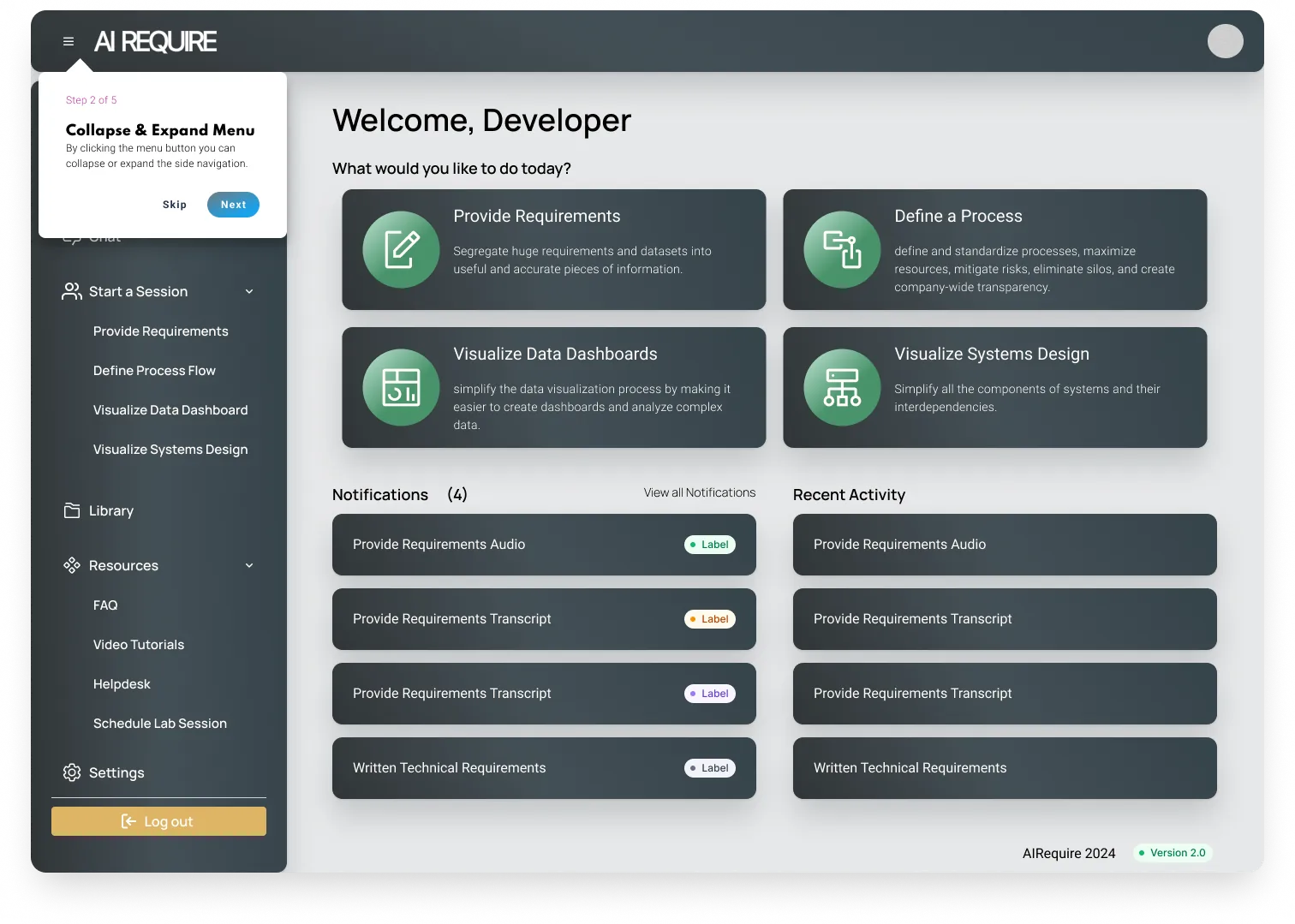
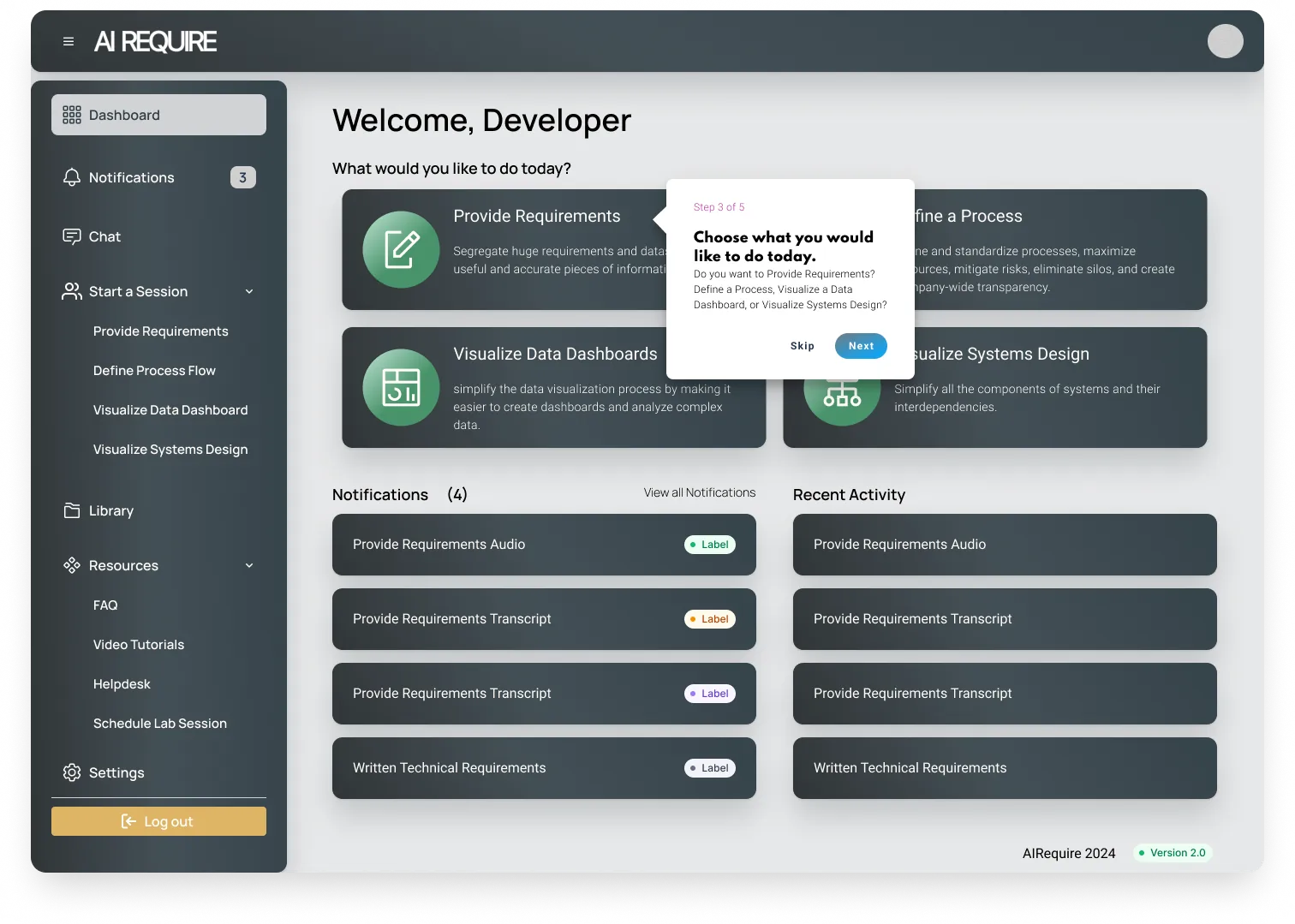
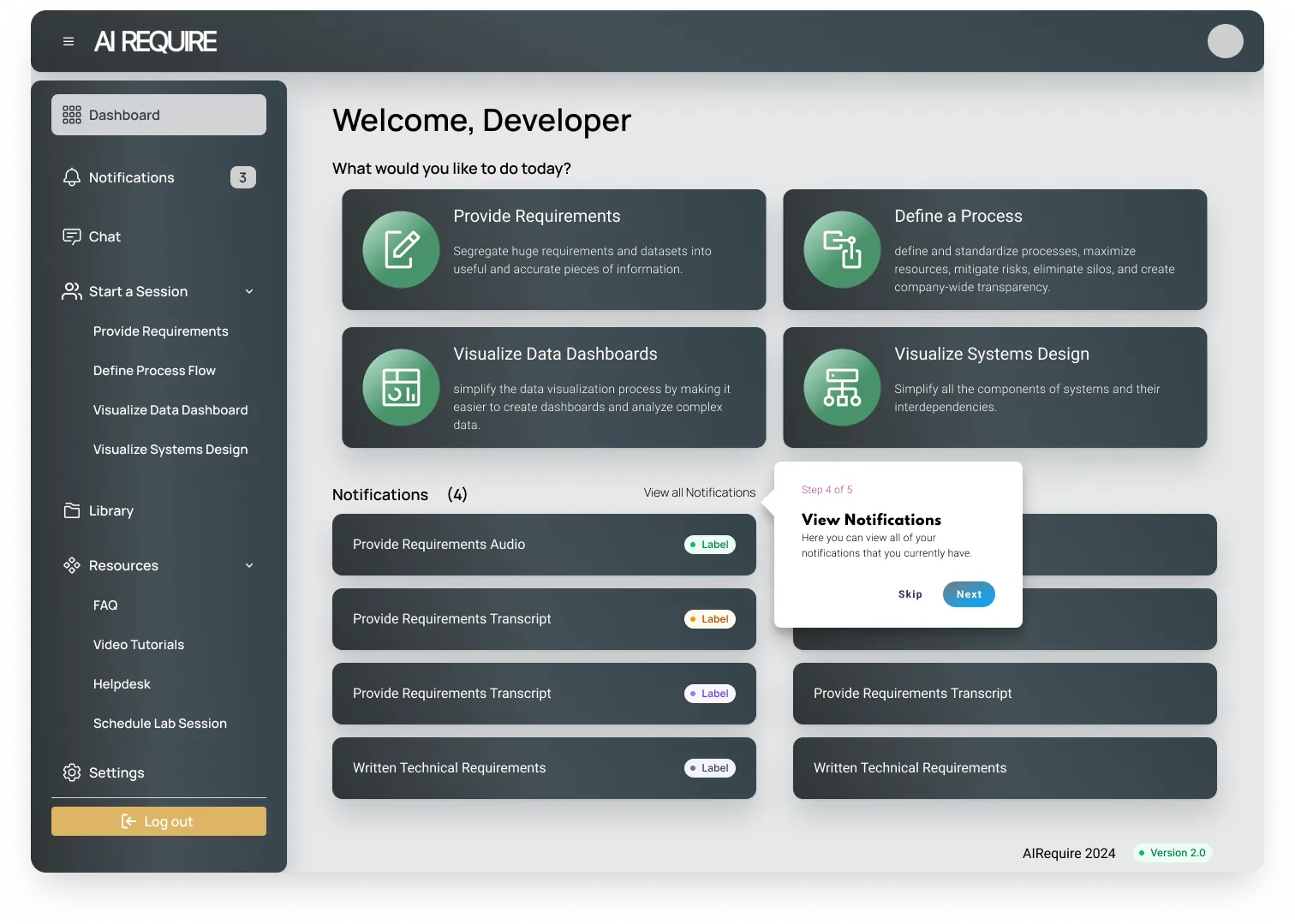
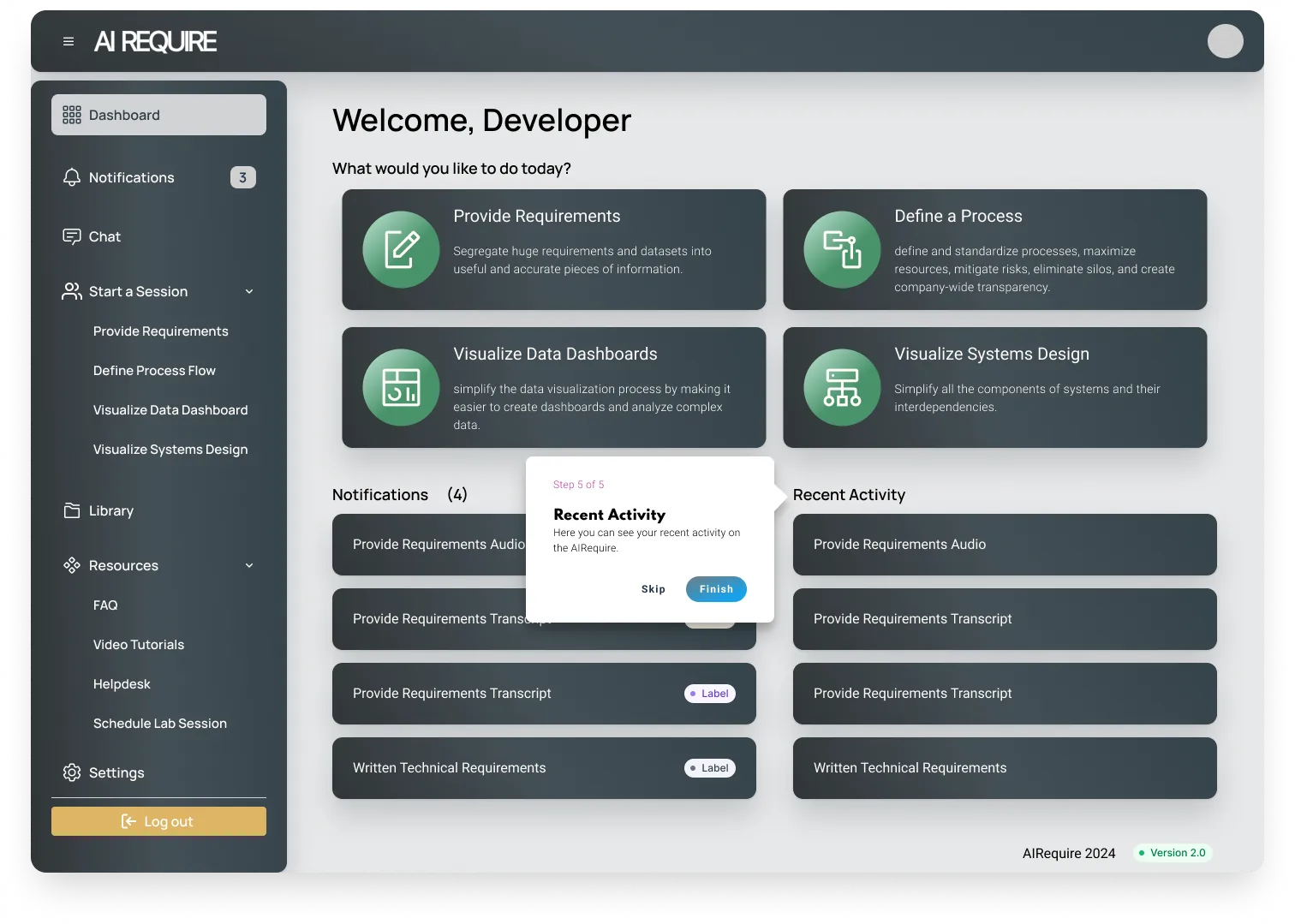
  • Five-step contextual onboarding tour

    Tooltips positioned dynamically relative to whatever element each one described. Built from scratch; V1.8 had nothing like it.

  • Design system (in flight at departure)

    Token-based, twelve core components at launch, picked up by every feature that came after. The full move to tokenizing everything was still in progress when I left.


What I owned

There were no separate design and engineering teams, so I covered both

UX / interaction design

End-to-end design process

I mapped the existing user journey, defined the new interaction model, and took it from wireframes to high fidelity. Every V2.3 screen went through several rounds of stakeholder feedback. No design support, so I was solo across the whole surface.

Front-end engineering

Built in React, solo

The transcript editor needed a custom rich-text setup that synced edits to the AI layer without dropping state. The audio recorder was custom-built on the Web Audio API, no third-party library. I was the only front-end engineer on the rebuild.

AI integration

Transcription → review → extraction pipeline

I added an explicit human review checkpoint: users edit and emphasize the transcript before the AI generates requirements. That removed an entire class of downstream errors.

Design system

Built from scratch, in flight at departure

V1.8 had no component consistency at all. I built a token-based system with twelve core components that became the base for every feature after it. Tokenizing everything was the goal, and it was still in progress when I left.


V1.8 → V2.3

Every screen, annotated

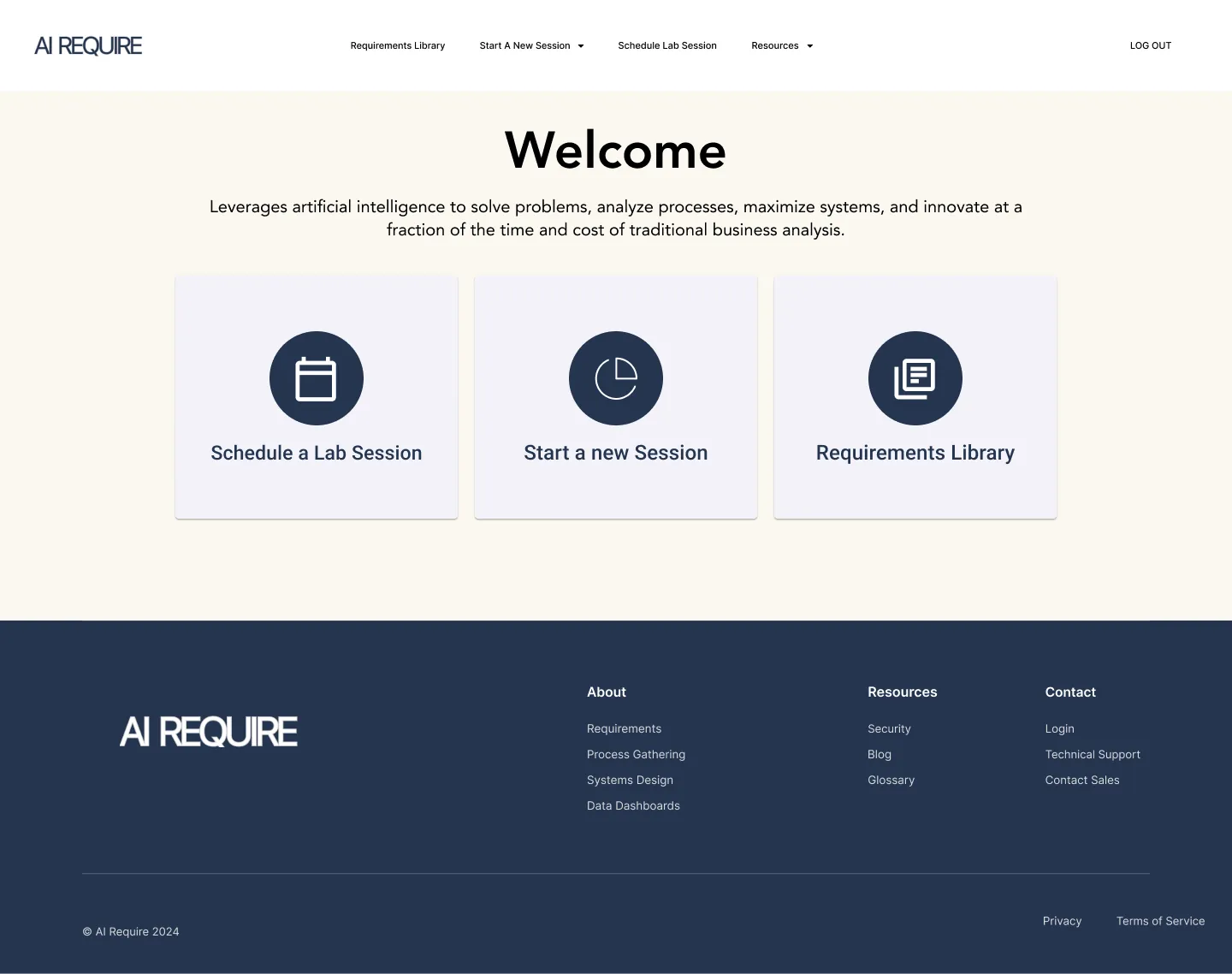
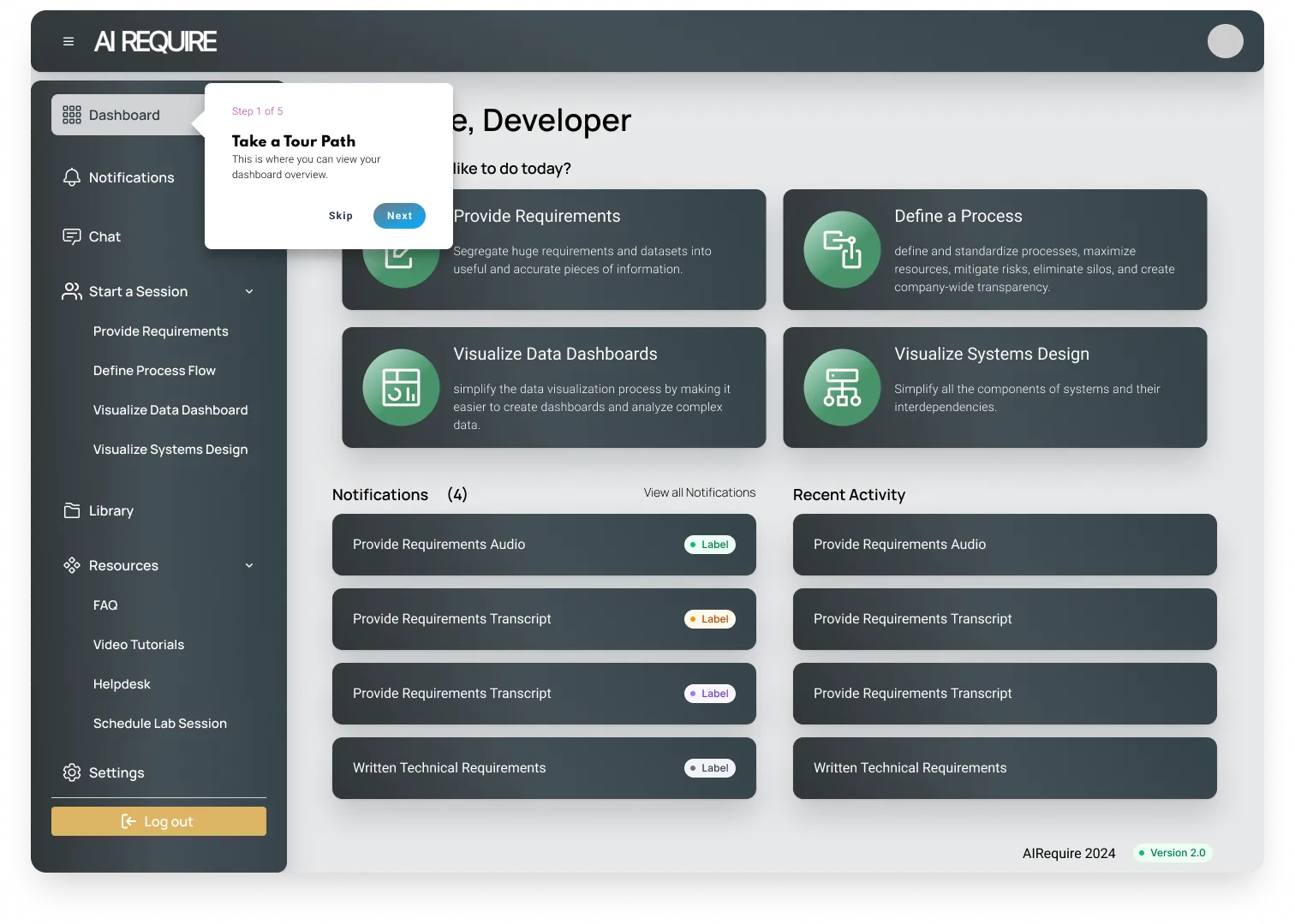
These are real screens from the V1.8 product, rebranded as AI Require for portfolio context. Toggle to V2.3 to see what shipped after the rebuild. Red dots mark what didn't work, green marks the rebuilds, and amber notes engineering decisions.

The product UI looked integrated. Behind every button was a manual back-channel.

airequire.app / welcome
V1.8 · welcome screen

V1.8 · welcome screen

Three options, one back-channel. Whichever path a user clicked, the workflow underneath was the same: collect audio, then hand it to a team member to process manually.

"Requirements Library" is a list of Word docs. Users assumed a project workspace. What they got was a flat list of emailed deliverables, regenerated by hand for every customer.

No session history, no return path. Logging back in dropped you here, with no way back into work in progress.


The texture

The interaction I spent the most time on

The interaction I spent the most time on never made it onto a feature list. The transcript editor needed a way for users to mark a sentence as load-bearing, meaning "this is the part the requirements doc has to get right," and have that mark survive AI extraction. In most products, highlighting text is a throwaway interaction. Here it was basically the contract between what the user meant and what the AI produced, so every small decision in it carried downstream cost.

If the visual treatment was too heavy, it felt like commenting, like a separate object floating over the text. Too light, and users wouldn't trust that the emphasis would carry through, so they'd over-mark to be safe. It took three rounds of design and three rounds of React to land on something that worked: you select text, the emphasis stays visible through the rest of the session, and the prompt that runs on the approved transcript treats those spans as anchors instead of noise. On screen it looked like a simple Notion-style highlight. Underneath it was a small piece of structured data the extractor knew how to read.

It got one line in the product docs and about three weeks of my attention, and honestly that ratio was about right.


Onboarding system

5-step guided tour, designed and built from scratch

Every new user gets walked through the dashboard once: five tooltips, each positioned dynamically relative to the element it points at. I built it from scratch; V1.8 had nothing like it. Dropping someone into a complex SaaS with no guided first session is one of the quickest ways to lose them.


Results

What shipped and what it changed

~50%
Reduction in requirements gathering time
client-reported post-launch
38+
Languages supported, transcription end to end
platform claim
V1.8→V2.3
Platform migration: WordPress → React, manual → automated
2023–2024 build
4→1
Document silos collapsed into a single Library
IA redesign

What shipped delivers AI transcription in 38+ languages, translation in 40+, and the roughly 50% cut in business-analysis and development time that AI Require markets. All of it comes out of the 4-step flow, the custom audio stack, and the Library architecture. Within a quarter of the rebuild, the team was past remediation work and building expansions on top of the same component system.

Shipped with a small founding team: one full-stack engineer, one devops engineer, and product feedback from the founding leadership. Design, front-end engineering, the audio stack, and the design system were all me.

What this project taught me about AI-powered UX.

The parts that need the most design attention usually aren't the AI's capabilities. They're the handoffs, the moments where the user decides whether to trust the output and keep going. The approve-before-proceed step, honest loading states, emphasis that survives extraction, the confirm-before-reset guard, the QA loop we deliberately kept outside the product. When those transitions are right, the AI feels genuinely useful. When they aren't, it feels unreliable, which is a worse problem when your marketing is promising the opposite.

Why the designer-who-codes matters.

Design decisions shaped the implementation architecture, and what I ran into while building shaped what I designed next. Holding both layers meant the gap between what we designed and what actually shipped was basically zero. The recorder's reset-confirm pattern, the highlight-as-anchor contract, the approval workflow: those all started as design ideas, and they survived contact with React because the same person was responsible for both ends.

What's next.

The fully-tokenized design system was the long game, and it didn't finish on my watch. Twelve core components shipped and got adopted everywhere, but the broader system was still being built out when I left. What did land was the trust-handoff pattern: confirm-reset on the recorder, emphasis that survives extraction, multi-level approval before any doc leaves the building, and QA kept deliberately outside the loop. The open question is whether that pattern carries from requirements into the product's other surfaces. I think it does. It's the same underlying psychology in a different shape.